Read offline
With Keep articles for offline reading, AURA keeps the full text and images of articles on your device, so you can read them without a signal. In the list, articles you can read offline have a cloud mark.
How it works
- AURA keeps the full text and images of saved articles (first) and new articles (for 48 hours after they arrive)
- It fetches them only on Wi-Fi, while AURA is closed. While AURA is open, it pauses to show the list and articles first
- It rests while your battery is low or your device is hot
- On mobile data, AURA fetches only the article you open, when you open it. The same goes for articles older than 48 hours
- Automatic prefetch uses up to 50 MB a day (this limit doesn't apply while your device is charging on Wi-Fi)
Settings
Go to Settings > Offline & storage.
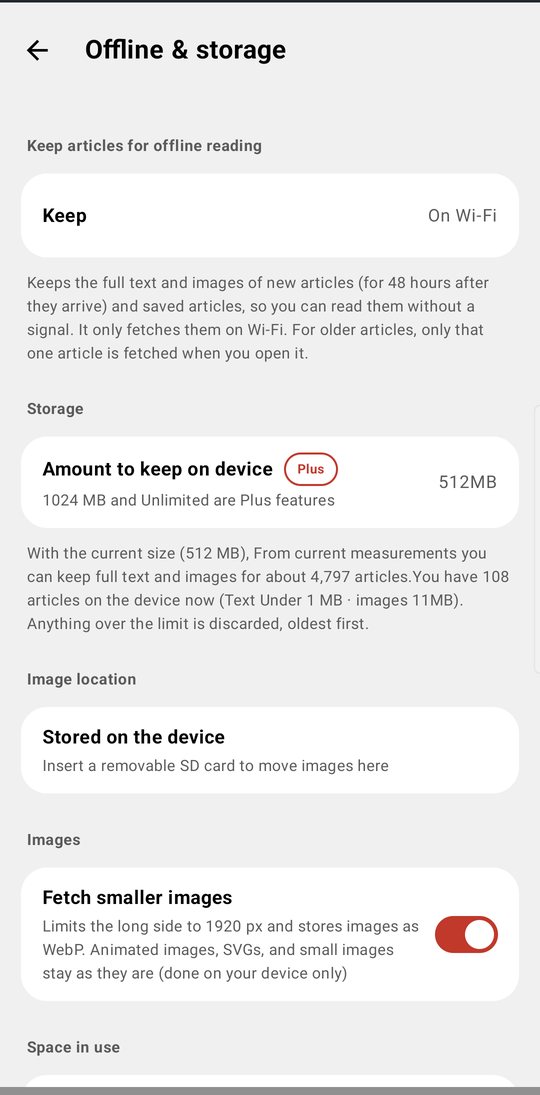
- Keep articles for offline reading — On Wi-Fi (recommended) or Don't keep (AURA fetches only the article you open, when you open it)
- Storage > Amount to keep on device — 128, 256, 512, or 1024 MB, or Unlimited. A quarter goes to text and three quarters to images. Anything over the limit is removed, oldest first (saved articles stay). Free accounts can use up to 512 MB. 1024 MB and Unlimited are AURA Plus features
- Image location — With a removable SD card inserted, tap Move images to SD card. Article text stays on the device, so articles aren't lost if you remove the card
- Images > Fetch smaller images — Limits the long side to 1920 px and stores images as WebP (done on your device only)
- Space in use — Articles available offline (the count), Article text, Images, Total, and Data used this month
- Free up space
- Clean up read articles and Clean up now (see Read and save)
- Delete fetched full text and images (read articles) / Delete fetched full text and images (all) — Full text of saved articles stays
Progress
While AURA is fetching full text, ↻ and a count appear at the top right of the list (see Refresh progress). When a fetch finishes, the bottom of the list shows Full-text fetch done with a breakdown (fetched, failed, images, and data used) for a short while. The top of the drawer also shows Articles you can read offline with the number on your device, such as “2187 / 11753.”
To learn what happens when full text can't be fetched, see Full-text fetch.