Read and save
Switch views
At the top left of the list, under “AURA,” tap All articles ▾ (the name of the current view) to switch.
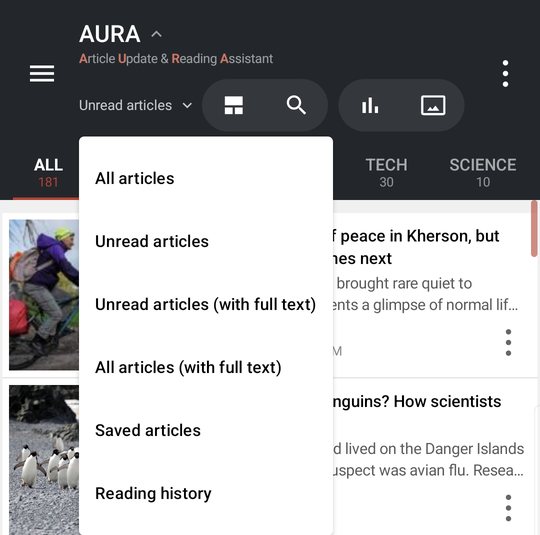
- All articles
- Unread articles (the default)
- Unread articles (with full text) — Only unread articles you can read offline
- All articles (with full text)
- Saved articles
- Reading history
AURA remembers your choice, so the next time you open it, you start where you left off.
In the List layout, swipe the list left or right to move to the folder next to it (in Magazine, swiping turns pages).
When articles are marked as read
- When you open an article (including an article you stop on while swiping left or right in the article screen)
- When Settings > Read & listen > Open in browser is on: when you tap it in the list
Scrolling the list doesn't mark articles as read. Prefetching (keeping articles for offline reading) never changes read status.
Mark many as read
Tap ⋮ at the top right of the list > Mark all as read. Choose the Range to mark as read, then confirm.
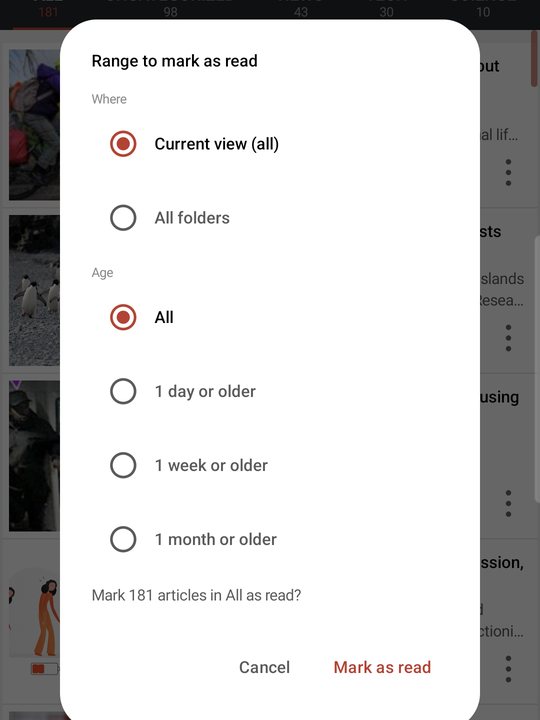
- Where — The current view (shown by folder or feed name) / All folders
- Age — All / 1 day or older / 1 week or older / 1 month or older
Check the count, then tap Mark as read. For a few seconds afterward, Undo also appears.
Save
Keep articles to read later. Saved articles aren't removed when AURA cleans up old articles to save space.
- Touch & hold an article in the list (touch & hold again to remove it from saved)
- Tap ⋮ on an article > Save
- Tap the bookmark icon at the top of the article screen
Old article cleanup
To keep the article count from growing too large, AURA automatically removes old articles from each source, oldest first, so everything fits within Settings > Offline & storage > Amount to keep on device. Saved articles stay.
Once an article is removed, AURA doesn't fetch it again, even if the source still lists it. Fetching it again would turn a read article back into unread.
Clean up read articles
Read articles that you haven't saved are removed automatically once a day, with their text and images, 30 days after you read them. Saved and unread articles stay. To clean up right away, go to Settings > Offline & storage > Free up space > Clean up now.
With AURA Plus, choose the number of days in Settings > Offline & storage > Free up space > Clean up read articles (3, 7, 14, 30, 60, or 90 days).
With AURA Plus, use Settings > Collect > Filters to hide articles that contain certain words, or pin them to the top.