Refresh progress
While AURA is refreshing feeds, fetching full text, translating, or doing other work, ↻ and a count (the number of tasks running) appear at the top right of the list. The mark shows only while something is running.
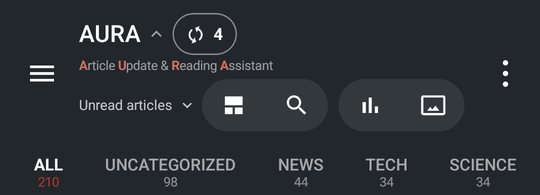
See what's running
- Tap — Shows Running tasks (N) on top of the list for 4 seconds. It stays while you touch or scroll it
- Touch & hold — Keeps the list open (the mark changes to a pin). Touch & hold again, or tap ✕, to go back
The list shows each task with its progress, such as refreshing sources or fetching the full text of new articles. Tasks that are waiting show why. When everything finishes, you see ✓ All done and the mark goes away.
To refresh yourself, pull down on the list or tap ⋮ > Refresh.
New versions of the app
If you installed AURA from Google Play, “A new version is available” appears above the list when there's a new version. Tap Update to download it in the background. When it's done, the message changes to “The update is ready.” Tap Restart to switch to the new version.
AURA checks Google Play at most once a day. To check right now, go to Settings > Info & support > Check for updates.