AURA Plus
AURA is built so that you can use it as your everyday reader for free.
- No limit on the number of feeds
- No account to create with us
- The only server we run is one relay (for AURA Brief · Audio scripts, episode counts, the free-trial device token, and shared dictionaries). It never receives your feeds, read status, or articles. You sign in to Google only when you use sync between devices (below, optional), and your data is saved in your own Google Drive
AURA Plus adds features that help you keep up as you read more. It's a monthly subscription. The price is shown in Google Play for your country.
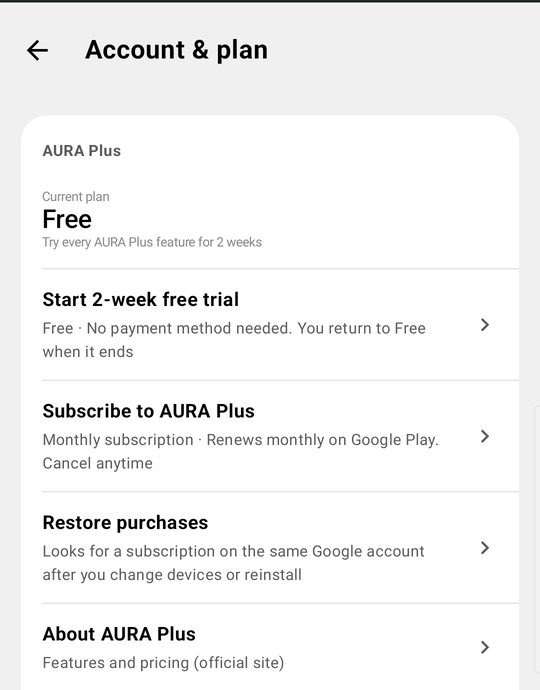
In the app, go to Settings > Account & plan > Subscribe to AURA Plus. You subscribe through Google Play, which shows the price for your country.
What you can do for free
- Unlimited feeds
- Subscribe to RSS / Atom feeds, and import and export OPML
- Folders, read management, and on-device search
- Full-text extraction and offline reading
- Image cache
- Themes (Light, Dark, Black) with your own colors, and a choice of list layouts
- Add feeds from other apps' "Share" menu
- Keyword feeds (up to 3) — AURA follows Google News search results for your country as a source. You can also choose Medium (by tag), DEV (by tag), and Hacker News (by title); these are off by default. If 3 aren't enough, AURA Plus makes them unlimited
- Ads are shown
What you get with AURA Plus
A monthly subscription (the price is shown in Google Play for your country). Everything in Free stays, plus:
Features that pay off the longer you use AURA
- Filters — Hide articles that contain certain words from the list, or pin them to the top. Choose whether to match titles only or the article text too, and whether to apply to all feeds or to a folder or feed
- Choose how long read articles are kept — Articles you've read but not saved are cleaned up, text and images included, 30 days after you read them, even on Free (to protect your phone's storage). With AURA Plus, choose anywhere from 3 to 90 days. Saved and unread articles are never deleted
- Unlimited keyword feeds — Follow Google News search results as a source. Free is limited to 3. Keyword editions for other countries and importing keyword feeds from OPML (Free imports up to your open slots) are also AURA Plus
- Sync between devices — Keep feeds, folders, filters, settings, and read status the same across devices. Data is saved in an app-only folder in your own Google Drive (you can't see it either), and we never receive it. You can set a "main device," and when you switch phones, the new device can take over as main even if the old one is no longer with you
- Even G2 support — Read articles on your smart glasses
- Merge duplicate stories — When the same story is republished on several sites, AURA keeps one and hides the rest. Open the hidden ones from the line under the card that remains, which shows how many other outlets carried the same story. Reading any one of them marks the merged articles as read too. Choose which one to keep (the original outlet, or the first to arrive) and which sites never to merge. Nothing is deleted, only hidden, so turning this off restores everything right away
- Download AURA Brief reports (PowerPoint, Excel, Word, PDF, CSV) — Save AURA Brief reports (key points, rising words, word trends, outlet mix, time of day, words that appear together, tone estimate, and featured articles) as PowerPoint, Excel, Word, PDF, or CSV, or send them to other apps. You can edit the numbers in PowerPoint charts with "Edit Data." Browsing AURA Brief, making reports, and viewing every page on your phone are free. On Free, you can also save a PDF once by watching one ad (with a daily limit)
- Narrated reports — Add the voices to a report, and its pages turn along with the narration (if there's no audio briefing episode for that period yet, AURA makes a new one)
- AURA Brief · Audio (Beta): 3 episodes a day, ad-free — After that, 1 ad per episode, up to 8 a day. You can save episodes as audio (m4a). On Free, watch one ad to make 1 episode a day
- World view — Gather keyword articles from Google News in other countries, with headlines and summaries translated on your device
- Photo frame — Show photos with article headlines. It also works as a screen saver
No ads, plus things you set up once
- No ads
- Select all in the source directory — Select every feed you don't follow yet in a topic at once (picking feeds one by one is free)
- Widgets — Put an article list on your home screen
- Store more (full text and images) — Raise the limit on how much full text and how many images AURA keeps
Free vs. AURA Plus
| Free | AURA Plus | |
|---|---|---|
| Number of feeds | Unlimited | Unlimited |
| RSS / Atom, OPML, folders, read status, search | ✓ | ✓ |
| Offline reading, image cache | ✓ | ✓ |
| Themes, list layouts, subscribe from Share | ✓ | ✓ |
| Ads | Shown | Not shown |
| Filters | — | ✓ |
| Cleanup of read articles (read but not saved) | 30 days | Choose the number of days |
| Keyword feeds | Up to 3 | Unlimited |
| Sync between devices | — | ✓ |
| Even G2 support | — | ✓ |
| Merge duplicate stories | — | ✓ |
| Browse AURA Brief, make and view reports | ✓ | ✓ |
| Download AURA Brief reports (PowerPoint, Excel, Word, PDF, CSV) | 1 PDF per ad | ✓ |
| Narrated reports | — | ✓ |
| AURA Brief · Audio (Beta) | 1 episode a day per ad | 3 a day, ad-free (then 1 ad each, up to 8) |
| World view (other countries) | — | ✓ |
| Photo frame | — | ✓ |
| Select all in the source directory | — | ✓ |
| Widgets | — | ✓ |
| Store more (full text and images) | — | ✓ |
| Price | Free | Monthly subscription (price shown in Google Play) |
Try it
Try every AURA Plus feature with a 2-week free trial.
- The trial starts when you tap Settings > Account & plan > Start 2-week free trial. Installing the app doesn't start it
- No payment method is needed, and you return to Free when it ends (you're never charged automatically)
- The trial is available once per device. Clearing the app's data or reinstalling doesn't give you another one. You need a connection to start it
- If you subscribe during the trial, the trial ends right away
- When the trial ends, your filter rules and cleanup settings are kept. They just stop working, and they work again as before when you get AURA Plus
FAQ
What happens when the trial ends?
You go back to Free. AURA Plus features stop, but your filter rules and settings are kept. Nothing happens to your feeds, read status, or saved articles.
If I cancel, what happens to my feeds and articles?
They stay. Your feed list, read status, and saved articles have been on your device from the start, so they aren't deleted when you stop AURA Plus.
Can I move my AURA Plus data to a new phone?
There are three ways.
- Sync between devices (AURA Plus) — Sign in to the same Google account on the new device, and your feeds, folders, filters, settings, read status, and list of saved articles come over. Even if the old device is no longer with you, choose "Make this the main device" on the new one to take over
- Move to a new phone (free) — In Settings > Connections > Move to a new phone, put your feeds, folders, filters, saved articles, and settings into one file, then import it on the new device (read status and purchases aren't included; use Restore purchases for AURA Plus)
- OPML — To move just your feed list, use "Export OPML" and "Import OPML" from the "⋮" menu in Settings > Collect > Manage feeds (see Import and export with OPML)
AURA Plus payments are tied to your Google Play account, so you can use it on a new device with the same account.
How do I pay?
Through Google Play. Manage payment methods or cancel in Google Play under "Payments & subscriptions." We never receive your card number or other payment details.